The only Revit add-in that automatically avoids fittings, valves, and obstructions during placement. No manual fixes. No rework. Just clean, code-compliant results.
Everything you need for efficient hanger placement
Automatically detects AND avoids fittings, valves, flanges, and existing hangers. Other tools only detect - we prevent.
When a clash is found, the algorithm searches step-by-step to find the optimal position. Step size is configurable in CSV rules.
Place hangers on entire fire protection systems with one click. No more tedious manual placement.
Follows NFPA 13, MSS SP-69, FM Global and other industry standards. Always audit-ready.
Automatically calculates rod length to structural elements like floors and beams.
All fire protection systems from host AND linked models appear automatically when you open the app. No manual searching.
Every decision logged: placements, clashes avoided, iterations performed, skipped pipes, and why. Full audit trail for QA/QC.
Assign different hanger families for each pipe diameter. DN25 can use one family, DN100 another. Full flexibility for your project needs.
Other tools detect clashes after placement. We prevent them during placement.
Place hangers at fixed intervals
Run clash detection in Navisworks
Find 50+ clashes with fittings
Manually fix each one
Select systems and click Insert
Algorithm checks each position
Clash found? Auto-iterate 10mm
Clean model, zero clashes
Tees, elbows, reducers, couplings - no hanger will be placed on any fitting
Gate valves, check valves, butterfly valves - all detected and avoided
Flanged connections are identified and given proper clearance
Already have hangers? We won't duplicate or place too close
Checks collision with ALL pipes in the model, not just the host pipe
Beams, columns, and other structural members in linked models
Walls from host and linked architectural models are detected
HVAC ductwork and other MEP elements that may intersect
Configurable minimum clearance from all obstructions
Clash detection works across all linked Revit files - not just the host model. Structural, architectural, and other MEP models are all included in the clash check. True multi-discipline coordination.
Our algorithm intelligently ignores pipe insulation and duct insulation during clash detection. This prevents false positives and ensures hangers are placed based on actual pipe geometry, not insulation layers.
Step 1: Initial position falls on fitting - CLASH!
Step 2: Move by iteration step, check again...
Step 3: Clear position found - hanger placed!
Fully Configurable: IterationStep=10 (mm, adjust as needed) • ClearanceDistance=100 (mm, minimum gap from obstacles)
Four simple steps to automated hanger placement
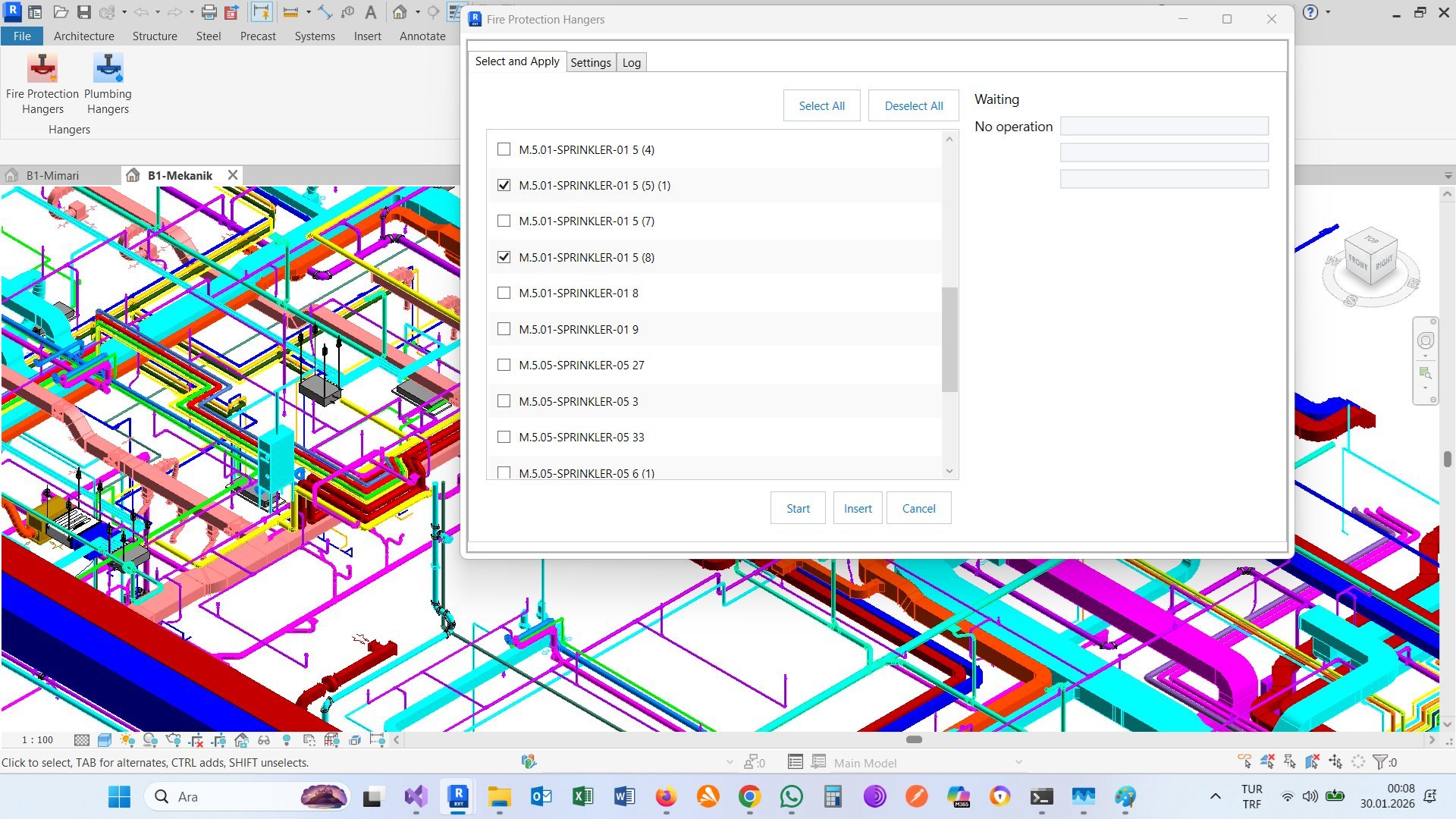
All fire protection systems automatically detected - including linked models
Instant detection: The moment you open the application, it automatically scans your entire Revit project - including all linked files - and lists every fire protection piping system. No manual searching required.
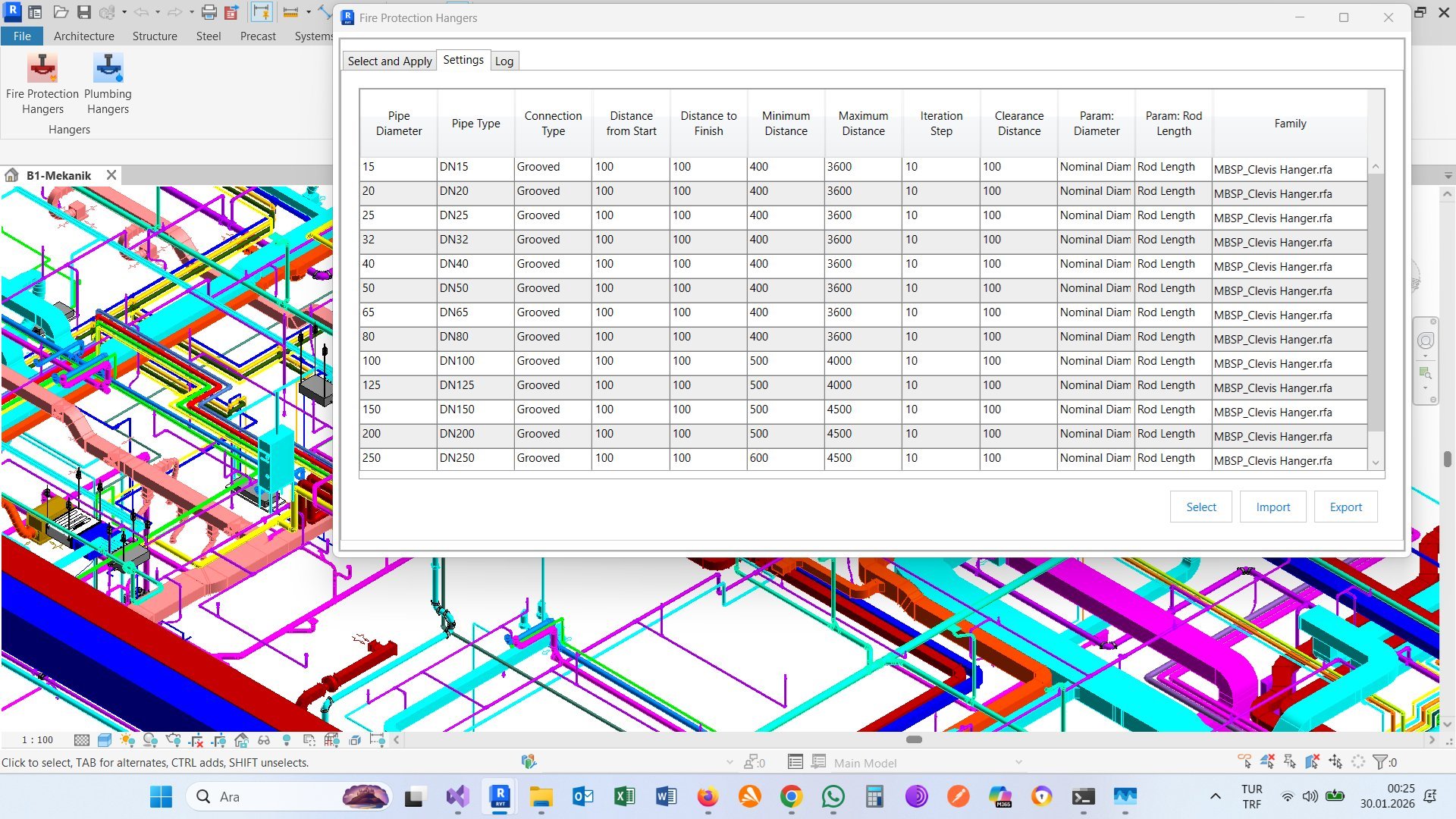
Set spacing, clearances, and hanger families per pipe size
Define placement rules for each pipe diameter using an easy-to-edit CSV file. For each pipe size, you can specify:
Application analyzes pipe runs and extracts placement candidates
The Start button analyzes your selected systems and extracts all pipe runs. During this phase, the application:
Hangers are placed automatically with clash detection
The Insert button performs the actual hanger placement with intelligent positioning. For each run:
Know exactly what happened, where, and why. Every decision documented.
Pipe ID, position, hanger family used, rod length calculated
When clash detected, each step is logged until clear position found. Step size is user-configurable (default: 10mm)
What element caused clash (fitting, valve, wall, duct, etc.) and how it was resolved
Pipes that couldn't receive hangers and why (too short, no matching rule, vertical, etc.)
Total pipes processed, hangers placed, clashes detected, time elapsed
QA/QC Ready: Auditors can verify every placement decision
Easy Debugging: If something looks wrong, check the log to see why
Project Documentation: Keep logs as part of project records
Rule Optimization: See which rules are being applied most often
[14:32:15] ═══════════════════════════════════════════════════ [14:32:15] FIRE PROTECTION HANGERS - Run Started [14:32:15] Selected Systems: 3 | Total Pipes: 247 [14:32:15] ═══════════════════════════════════════════════════ [14:32:16] Processing: Wet Sprinkler - Level 1 (89 pipes) [14:32:16] ─────────────────────────────────────────────────── [14:32:16] Pipe #142587 | DN50 | Length: 4250mm [14:32:16] → Position 1: 850mm - CLASH with Tee fitting [14:32:16] → Position 2: 860mm - CLASH with Tee fitting [14:32:16] → Position 3: 870mm - CLEAR ✓ [14:32:16] → Hanger placed at 870mm | Rod: 2340mm [14:32:16] → Position 4: 3150mm - CLEAR ✓ [14:32:16] → Hanger placed at 3150mm | Rod: 2340mm [14:32:17] Pipe #142592 | DN25 | Length: 1850mm [14:32:17] → Position 1: 450mm - CLASH with Gate Valve [14:32:17] → Iterating... found clear at 620mm ✓ [14:32:17] → Hanger placed at 620mm | Rod: 2180mm [14:32:18] Pipe #142601 | DN20 | Length: 890mm [14:32:18] → SKIPPED: Pipe too short for min spacing (1200mm) [14:32:45] ═══════════════════════════════════════════════════ [14:32:45] RUN COMPLETE [14:32:45] ─────────────────────────────────────────────────── [14:32:45] Pipes Processed: 247 [14:32:45] Hangers Placed: 418 [14:32:45] Clashes Avoided: 52 [14:32:45] Pipes Skipped: 12 [14:32:45] Time Elapsed: 29.4 seconds [14:32:45] ═══════════════════════════════════════════════════
Not just for placing hangers - also a powerful QA/QC audit tool for delivered projects
Place hangers automatically on your fire protection systems with zero clashes.
Validate delivered projects by detecting design errors in existing hanger placements.
Detects hangers incorrectly placed on tees, elbows, reducers
Finds hangers placed on gate valves, check valves, butterfly valves
Identifies hangers that exceed maximum allowed spacing per code
Finds pipe runs that should have hangers but don't
Detects hangers that clash with beams, columns, walls
Hangers too close to fittings or other elements
Receive project model from contractor/subcontractor
Open in Revit and run Fire Protection Hangers
Review detailed log file for all detected issues
Send error report back for corrections
Why engineers choose Fire Protection Hangers
What used to take hours now takes minutes. Focus on engineering, not repetitive tasks.
Automatic clash detection eliminates human errors. No more hangers on fittings or valves.
Pre-configured rules follow NFPA 13, MSS SP-69, and other industry standards.
Design changed? Delete existing hangers and rerun. Hangers update automatically with your model.
Comprehensive logs showing every placement decision, clashes avoided, and issues found.
Complete more projects in less time. Improve your bottom line with automation.
Screenshots from the application
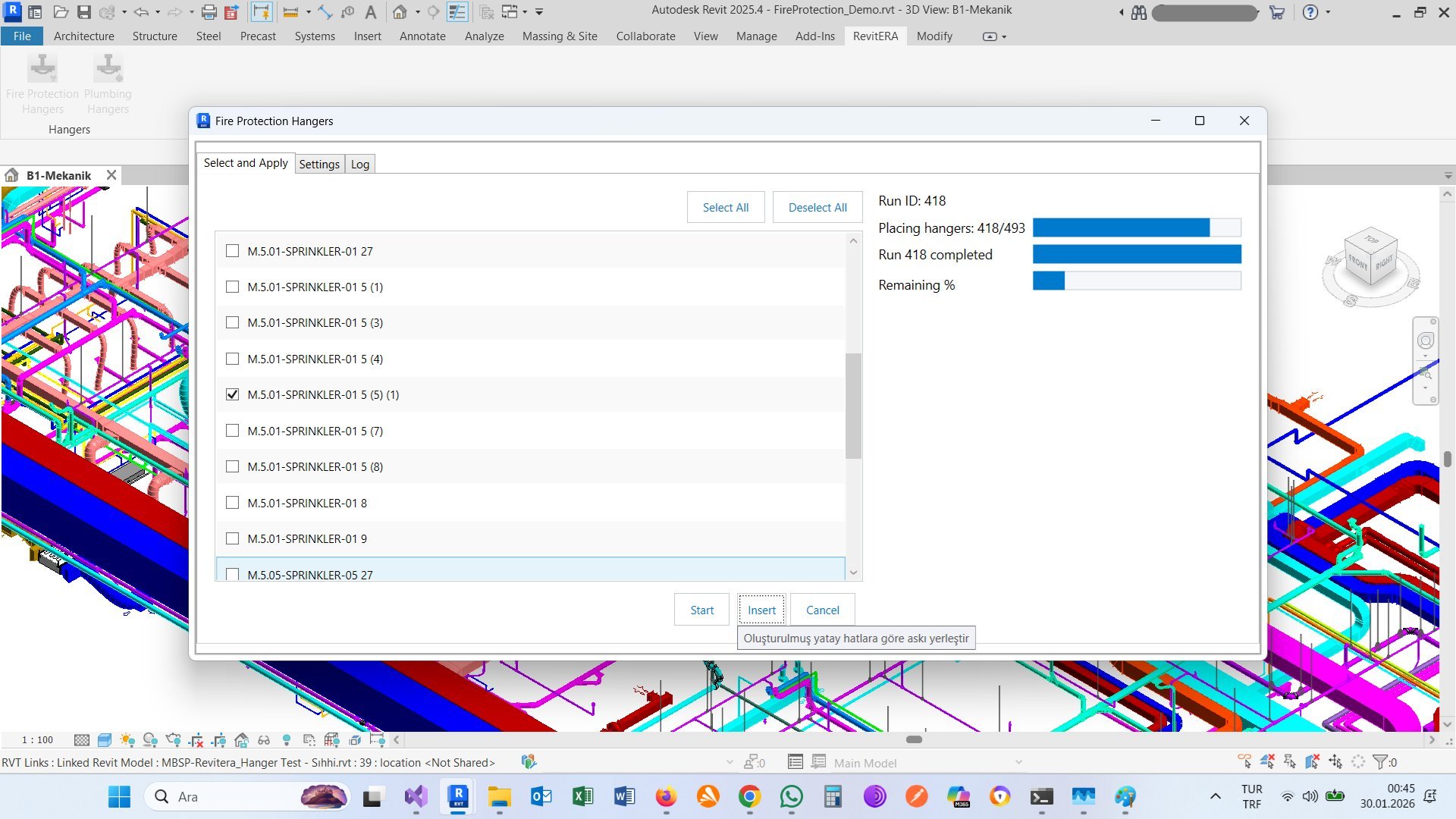
Clean, intuitive interface for system selection and configuration
Easy-to-use settings for spacing rules and hanger families
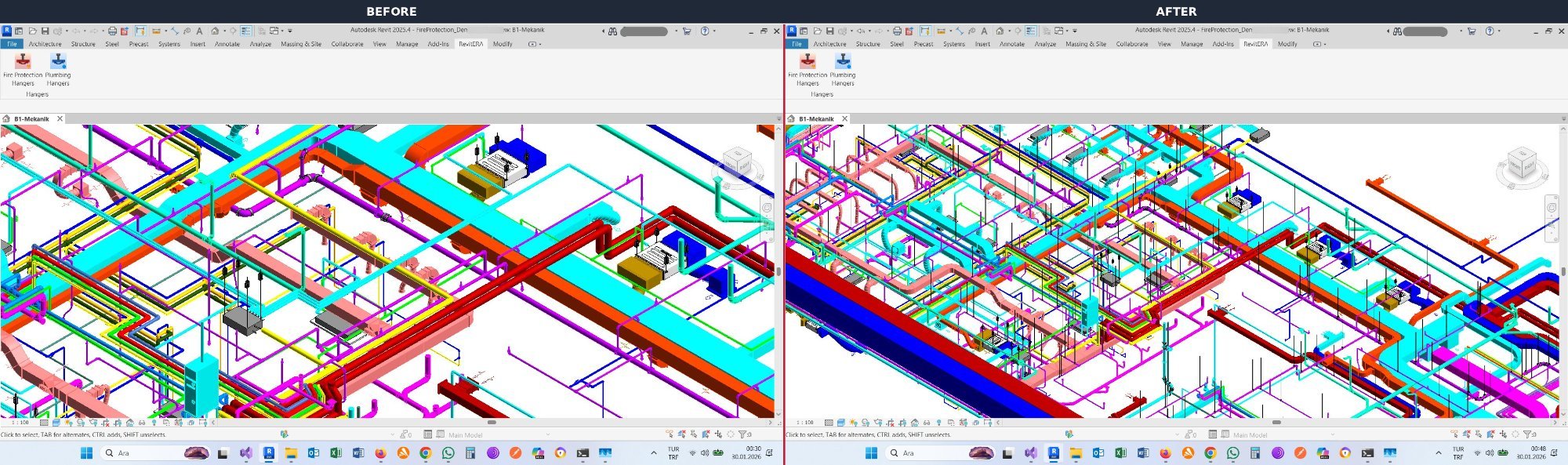
Automatic hanger placement - before and after comparison
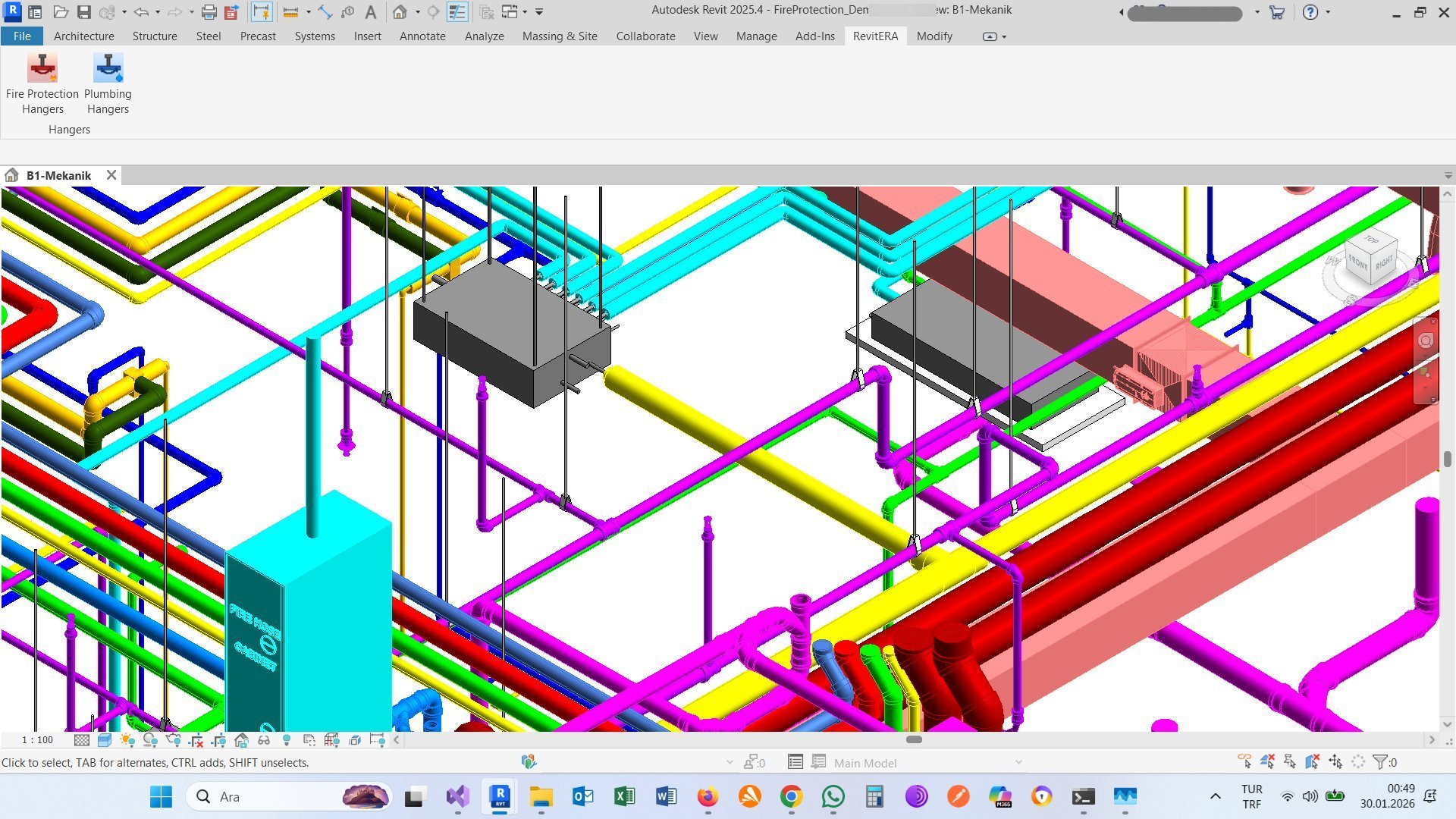
Detailed view showing hangers with rod connections
Real-time progress tracking during placement
Version 2025 or 2026
Windows 10 or Windows 11
Included with Revit 2025+
Download the free demo and try it on your own projects. No credit card required.
Download Free Demo Buy License14-day trial • 50 hangers per day • Full functionality
Join hundreds of engineers who have automated their hanger placement workflow